
10 utilities for a gaming PC: what to install in 2026
Besides drivers and games, it pays to install on a gaming PC mainly tools for monitoring temperatures and FPS, clean driver installation, recording gameplay, backing up save games and managing disk space. All the tools in this overview are free for home use. Compared with the 2022 version, we have dropped utilities that have ended or are no longer developed. The status of the tools reflects October 2026.
Summary
- Monitoring: MSI Afterburner with RivaTuner Statistics Server, HWiNFO.
- Drivers: the graphics card maker's app (NVIDIA App, AMD Software: Adrenalin Edition), and Display Driver Uninstaller when problems arise.
- Recording and streaming: OBS Studio.
- Disk tidiness: WinDirStat, Bulk Crap Uninstaller.
- Communication, backups and controllers: Discord, Ludusavi, Steam Input.
10 gaming PC utilities at a glance
| Tool | What it is for | Price |
|---|---|---|
| MSI Afterburner + RTSS | FPS, temperatures and load right in the game, frame limiter, card tuning | free |
| HWiNFO | detailed sensors for the whole PC, temperature logging | free for non-commercial use |
| NVIDIA App / AMD Adrenalin | drivers, game settings, recording and screenshots | free |
| Display Driver Uninstaller (DDU) | clean removal of graphics drivers | free |
| OBS Studio | recording and streaming | free, open source |
| Discord | voice and text chat with friends | free (paid add-ons) |
| Ludusavi | backing up save games | free, open source |
| WinDirStat | what is taking up disk space | free, open source |
| Bulk Crap Uninstaller | thorough uninstallation of programs and games | free, open source |
| Steam Input | remapping a gamepad for games without controller support | part of Steam |
MSI Afterburner and RivaTuner: FPS and temperatures in game
MSI Afterburner shows temperature, power draw, load and FPS right in the game and can set fan speeds. The in-game overlay is provided by the companion RivaTuner Statistics Server, which is offered during installation. According to MSI, it works with almost all cards, not just MSI ones. The current version 4.6.6 also supports GeForce RTX 50 cards. You do not need to overclock or undervolt the card to use it.
Download it only from the MSI or Guru3D websites. MSI explicitly warns against fraudulent sites with modified installers.
HWiNFO: sensors for the whole computer
When the PC crashes or performance drops in a game, HWiNFO shows the temperatures of the CPU, graphics card and drives as well as power supply voltages, and can log them to a file. From the log you can easily spot overheating. HWiNFO64 is free for home, non-commercial use. Business use requires a Pro licence.
Drivers: the maker's app and DDU
Update graphics drivers through the maker's app – NVIDIA App or AMD Software: Adrenalin Edition. NVIDIA App came out of beta on 12 November 2024 and fully replaced GeForce Experience. It does not need an NVIDIA account and records gameplay and screenshots via its overlay (Alt+Z).
If problems appear after an update, or you are switching to a card from a different brand, remove the old drivers with Display Driver Uninstaller. It handles NVIDIA, AMD and Intel drivers. The author recommends running it in safe mode and creating a system restore point beforehand.
OBS Studio: recording and streaming
OBS Studio is a free open-source program (GPL-2.0 licence) for streaming to Twitch or YouTube and for recording gameplay. New versions of the 32 series are still coming out in 2026. It can use the graphics card's hardware encoding, so in-game performance drops only slightly.
Discord: talking to friends
Discord combines voice chat, text channels and screen sharing. You can set up your own server for your group or clan for free in a few minutes.
Ludusavi: backing up save games
After reinstalling Windows, save games are easily lost. Ludusavi searches the disk and the Windows registry, finds save games and backs them up to a folder or to the cloud. It takes its data on where each game saves mainly from PCGamingWiki and covers over 19,000 games. It is open source (MIT licence) and also runs on Linux, macOS and the Steam Deck.
GameSave Manager from the original article still exists and received an update in May 2026. We list Ludusavi as the main choice because it is open and works on more systems.
WinDirStat and Bulk Crap Uninstaller: disk space
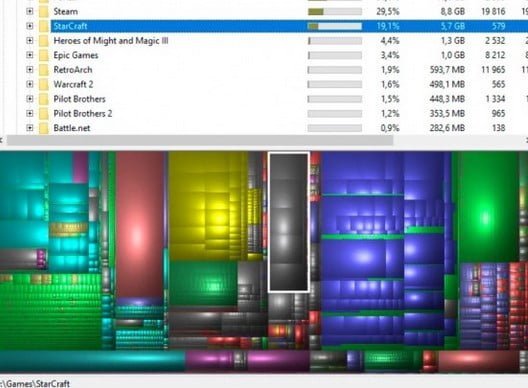
New games are often around 100 GB. WinDirStat shows graphically which folders take up the most space. In October 2024 it received its first major update in 19 years; as of 10/2026 the current series is 2.x. Bulk Crap Uninstaller then uninstalls programs and games more thoroughly than Windows and can remove several at once. Both tools are open source and free with no paid version. Bulk Crap Uninstaller replaces IObit Uninstaller from the original article.
Steam Input: a gamepad even where the game does not support one
Steam Input remaps gamepad buttons to keyboard and mouse, so you can play games with a controller even if they do not support one. It also works for non-Steam games that you add to your Steam library manually. It replaces Xpadder, which is no longer developed.
We no longer recommend the once-popular DS4Windows for PlayStation controllers. The original author stopped maintaining the project, and the follow-up version was also discontinued and archived in March 2026.
What we dropped from the original list and why
| Original tool | Why it was dropped | Replacement |
|---|---|---|
| Tunngle | the service ended on 30 April 2018 due to the GDPR regulation | Radmin VPN or ZeroTier for playing over a virtual LAN |
| Xpadder | no longer developed | Steam Input |
| GameSave Manager | still works, but only on Windows | Ludusavi (open source, multiple systems) |
| IObit Uninstaller | some features only in the paid Pro version | Bulk Crap Uninstaller |
| Borderless Gaming | most games today have a borderless window mode | still useful for older games; version 1.0 with a new core came out in September 2025 |
| WTFast | a paid service; the benefit varies by game and connection | try it only if you have latency problems |
What next
- PC and laptop service – when HWiNFO temperatures show overheating, cleaning and fresh thermal paste help.
- List of graphics cards – an overview of generations for a possible upgrade.
- Gaming PCs from PC Praha – ready-made builds.
Sources
Frequently asked questions
Does MSI Afterburner work with cards from brands other than MSI?
Do I still need GeForce Experience?
When should I use Display Driver Uninstaller?
What can replace Tunngle for LAN gaming?
This text was prepared with the help of AI. Facts, figures and procedures were checked by Yegor.