
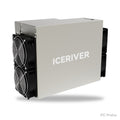
IceRiver AL3 15 TH/s


IceRiver · Blake3
IceRiver AL3 15 TH/s
- Prefer not to pay everything at once? A 50% deposit is enough; the price is then 2% higher: deposit 21 062 Kč incl. VAT, and you pay the rest once the miner is on its way.
- The date reflects the factory production date plus a few days for shipping and customs.
- We set up the miner free of charge to mine into your wallet.
How the pre-order works
- You order online and receive an invoice – for the full amount or for a 50% deposit (price +2%).
- Once we receive payment, we order from the manufacturer.
- As soon as the miner has a tracking number, we let you know. With a deposit, you pay the rest at that point.
- You collect the miner in Prague, we ship it to you, or we connect it straight away on our hosting.
What it can mine
Gross revenue before electricity, based on today’s difficulty and exchange rate. Coins without an amount are not calculated yet.
Suitable for
- Hosting
- Workshop, plant room
- Flat – 75 dB, loud
 Current hosting prices · 22/10/2026
Let it mine with us
The miner goes from the supplier straight to the data centre. We connect it and look after it; you just follow the earnings.
- from 1.14 Kč/kWhelectricity incl. management · with prepayment up to −30%
- 7-year warrantywhile the miner runs with us (at home 2 years)
- 7 data centresto choose from, uptime up to 99.85%
- 0 dB at home75 dB of noise stays in the data centre
Technical specifications
- Manufacturer
- IceRiver
- Algorithm
- Blake3
- Coins
- Alephium
- Hashrate
- 15 TH/s
- Power draw
- 3500 W
- Efficiency
- 233.3 J/TH
- Cooling
- Air
- Noise level
- 75 dB
- Power supply
- 220 V
- Condition
- New
- Warranty
- 24 months · 84 months when hosted with us
How much it earns
Enter your tariff. The default value is an example.
Revenue based on the current network difficulty and exchange rate, updated 24/10/2026 23:59. We use today’s revenue. In reality it changes with network difficulty, the exchange rate and halvings, so treat multi-year figures as indicative. Pool fees are not included.
- Personal collectionPrague 10
- ASIC miner repairsright here in Prague
- Pay by bank transfer or in cryptoBank transfer (CZK / €), USDT/USDC or cash at the shop
- VAT invoicereverse charge for EU businesses
Description
Dimensions: 370 × 195 × 290 mmWeight: 16.0 kg
ALPH: 15 TH/s
ALGORITHM: Blake3
WATT: 3500 W
ICERIVER ALPH AL3 15TH
A powerful mining machine for Alephium: the AL3
The ICERIVER ALPH AL3 is a high-performance ASIC miner designed specifically for the Blake3 algorithm used by the Alephium (ALPH) cryptocurrency. With a hashrate of 15 TH/s (±10%) and a power draw of 3500 W, this miner offers an optimal balance between efficiency and performance.
Key features:
- Hashrate: 15,000 GH/s
- Power consumption: 3500 W
The ICERIVER ALPH AL3 is a great choice for anyone who wants to mine Alephium on an industrial scale.
Iceriver ALPH MINER AL3 specifications
| Parameter | Value |
|---|---|
| ALPH hashrate | 15TH/s (±10%) |
| Power consumption | 3500 W (±10%) |
| Specification | 15TH / 3500W |
| Size (packed) | 490 × 300 × 400 mm |
| Device dimensions | 370 × 195 × 290 mm |
| Total weight | 16 kg |
| Connectivity | Ethernet |
| Input voltage | 220V AC |
| Operating temperature | 5~40℃ |
Mining profitability changes with the ALPH price and network difficulty. Use the calculator on this page to estimate current returns at your electricity price.
If you need help with setup or connection, do not hesitate to contact us!
Setup guide
We will set it up for you free of charge. Send us your wallet address and the miner will mine for you alone. If you do not have a wallet yet, we will help you create one.
Setting up an IceRiver minerDefault login: admin / 12345678
