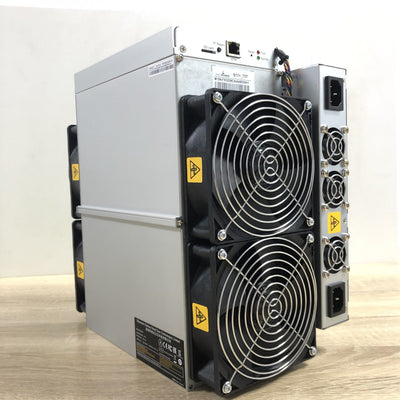
Hashrate hijacking: how to protect your ASIC miner and farm from being redirected to someone else's pool
Hashrate hijacking means an attacker overwrites the pool address in your miner, and your hashrate then mines for them. They usually don't get in through the firmware itself, but through a weak password, a miner exposed to the internet or compromised farm-management software. Protection rests mainly on five things: your own passwords, a separate network, only stratum allowed out, two-factor authentication on every account, and alerts when the number of workers drops.
Summary
- In November 2026 attackers used the Luxor Commander farm-management platform to redirect, according to reports, around 64,000 machines and 13 EH/s to the OCEAN pool. According to the company, neither Luxor's firmware nor its pool was compromised.
- The attacker doesn't have to "hack" the miner – access to the place from which settings are pushed in bulk is enough.
- Factory passwords such as root/root and a miner web interface reachable from the internet are the most common open doors.
- A hijack shows up in the pool statistics: the hashrate or the number of active workers drops, even though the miner at home is running and giving off heat.
- If your machines are hosted, ask the operator who can change the pool and how they monitor it.
What happened with Luxor Commander in November 2026
On Saturday 14 November 2026 at around 18:00 Pacific time (around 3:00 a.m. on 15 November in the Czech Republic), an attacker gained access to some customer accounts in Luxor Commander. Commander is a paid platform that large farms use to manage thousands of miners at once – including changing the pool in bulk. The attacker used this feature to redirect customers' hashrate to the OCEAN pool.
The hosting company CoreX estimated the scale at roughly 64,000 machines and 13 EH/s, or about 1.4% of the entire Bitcoin network's hashrate. Luxor did not confirm these figures; it only said that "a little over a dozen" customer accounts were affected. According to Luxor, the problem was fixed within about two hours, the machines were returned to their original pool, and the company promised affected clients full compensation.
Luxor has not yet disclosed exactly how the attacker got in. CEO Nick Hansen spoke of a "sophisticated AI-assisted attack", but promised details only in a post-incident review. According to CoreX, OCEAN paid out about 0.162 BTC to an address linked to the attacker. The OCEAN pool itself was not compromised – it simply accepted the hashrate the attacker sent to it. As of 24 November 2026 we had not found an official statement from OCEAN on the rewards paid out.
Why this matters for a small farm too
The key lesson: a miner is only as secure as the weakest place from which its pool can be changed. That can be the machine's web interface, a management program on a laptop, a cloud dashboard or a hosting account. A large farm and a home miner with two machines have the same problem – just on a different scale.
It is easy to work out what a hijack costs. Today 1 TH/s on Bitcoin earns approximately 0,64 Kč per day. A single Antminer S21 with 200 TH/s therefore mines roughly 128 Kč per day (as of 23 November 2026). If an attack lasts a week and nobody notices, you lose the whole week's earnings – but you still pay for the electricity. That is why fast detection is just as important as prevention.
How attackers most often take over a miner
| Attack route | How it works | What helps |
| Factory password | The miner's web interface still has the default login (e.g. root/root on Antminers). Anyone who gets into the network can change the pool within a minute. | Your own password on every machine right after connecting it |
| Miner exposed to the internet | A forwarded port on the router or a public IP. Bots scan the internet non-stop and will find an open interface. | No port forwarding, remote access only via VPN |
| Farm-management software | A stolen password or API key for a dashboard that changes settings in bulk – the Luxor Commander case. | Two-factor authentication, as few people as possible with the right to change the pool, change auditing |
| Compromised computer on the network | Malware on a PC in the same network finds the miners and overwrites their pool. | Miners in a separate network (VLAN) |
| Unverified firmware | Modified firmware from an unknown source may contain a hidden pool or fee of its own. | Only official firmware or verified alternatives |
How to protect an ASIC miner: step by step
- Change the factory password of the web interface on every machine. Use one password for the miners and different ones for the router and e-mail. We describe the first connection in the guide How to connect an ASIC miner.
- Remove port forwarding to the miner (80, 443, 4028, 22). The miner's interface should never be reachable from the internet.
- Put the miners in a separate network. A separate VLAN, or at least a separate router, stops a compromised laptop or smart TV from reaching the miners.
- Only let stratum out. On the router or firewall, allow the miners outbound connections only to the ports and addresses of your pools (e.g. 3333, 443). If an attacker changes the pool to a foreign address, the firewall blocks the connection.
- Turn on two-factor authentication (2FA) for your pool account, your management software and the e-mail that receives password resets. A hardware key or an authenticator app is best – not SMS.
- Set up alerts in the pool for drops in hashrate and in the number of active workers. Most pools can send an e-mail or a Telegram message.
- Write down the correct details: the pool address, account name and payout address. If you suspect something, you can immediately compare them with what is in the miner.
- Download firmware only from the official website of the manufacturer or a verified project. You will find an overview of the options in the article Firmware and software for ASIC miners.
How to tell that someone has hijacked your hashrate
After a hijack the miner keeps running, humming and heating – it just mines for someone else. You can't tell anything from the display or the sound. The warning signs are in the statistics:
- the hashrate in the pool drops or a worker disappears, even though the machine is switched on and shows full performance;
- the miner's interface shows a different pool address or worker name from the one you entered;
- rejected shares increase in the pool (we explain what they mean in the entry Share, reject and stale);
- pool payouts are lower or don't arrive at all.
If you discover it: disconnect the miners from the internet, restore the correct pool, change all passwords (miners, pool, management software, e-mail) and revoke old API keys. Only then reconnect the machines. For larger machines, a factory reset and a clean install of the official firmware helps – our ASIC miner service can help you with that.
What to ask your hosting provider
When your machines are in someone else's data centre, you only partly control the network. Before placing your miners and during operation, ask the operator – us or anyone else:
- Who besides you can change the pool, and how (manually, via management software, via API)?
- Are the miners in a separate network, with only outbound stratum traffic allowed?
- Does the hosting use third-party software for bulk management? How is access protected (2FA, permissions)?
- How quickly does the hosting detect a drop in hashrate, and how does it inform you?
- Who bears the loss if hashrate is redirected on the provider's side?
You will find details of our hosting in the Czech Republic, the USA, Finland and Nigeria on the ASIC miner hosting page. You can follow the current distribution of hashrate between pools and the network hashrate on the Mining statistics page.
What next
- How to start a mining farm – network, power and operation from the ground up.
- Mining pool: what it is and how to choose one.
- ASIC miner hosting – if you don't want to deal with the network and monitoring yourself.
Sources
- Crypto Briefing: Attackers hijack about 64,000 Bitcoin miners and point 13 EH/s at OCEAN
- TFTC: Luxor Commander Hijack
- CoinCentral: Luxor Promises Full Refunds After Attackers Redirect Customers' Mining Power
- Startup Fortune: Luxor says attackers hijacked its Commander mining software
- Bitcointalk: discussion of the incident
Text prepared with the help of AI; facts and procedures checked by Yegor.
Frequently asked questions
What is hashrate hijacking?
How can I tell that someone has redirected my miner?
Is changing the miner's factory password enough?
What should I do if I discover hashrate hijacking?
Was the miners' firmware compromised in the Luxor Commander attack?
This text was prepared with the help of AI. Facts, figures and procedures were checked by Yegor.